Intent-Driven Audio Compression Explained
Compression is often taught as a technical process: set a threshold, choose a ratio, adjust the attack and release, then compensate for the level change. That explains what a compressor does, but it misses the more important question:
Why are we compressing this sound in the first place?
Audio engineers rarely reach for compression simply because a track “needs compression.” There’s usually a practical or creative goal behind it. A vocal needs to feel closer. A bass part needs more consistency. Drums need extra impact, or perhaps less of it. Several instruments need to sit together as one unit. Sometimes the aim is simply to squash a sound until it develops a completely different character.
These are intentions, not parameter settings. M-Compressor 2 is designed to connect the two.
Compression is about direction
The same compressor can produce very different results depending on how its controls interact. A slower attack may let transients pass and bring out punch, while a faster attack can soften the front edge of a sound. Release time affects movement, density and how audibly the processing follows the performance. Threshold and ratio determine where gain reduction begins and how strongly the compressor reacts.
That’s already several moving parts, and their meaning changes with the source.
An attack setting that feels slow on a tightly played percussion track may behave quite differently on a sustained vocal. A suitable threshold depends on the signal’s level and dynamic range. Release timing needs to make sense in relation to the performance, its envelope and often the song itself. Even familiar settings can miss the mark when they’re copied from one track to another.
This is why experienced engineers listen in terms of outcomes. Does the sound need to come forward? Should it sit farther back? Does it need tighter control, more detail, greater density or a stronger sense of glue?
The controls are simply the route taken to get there. Admittedly, it’s a route with quite a few junctions.
From technical settings to creative intent
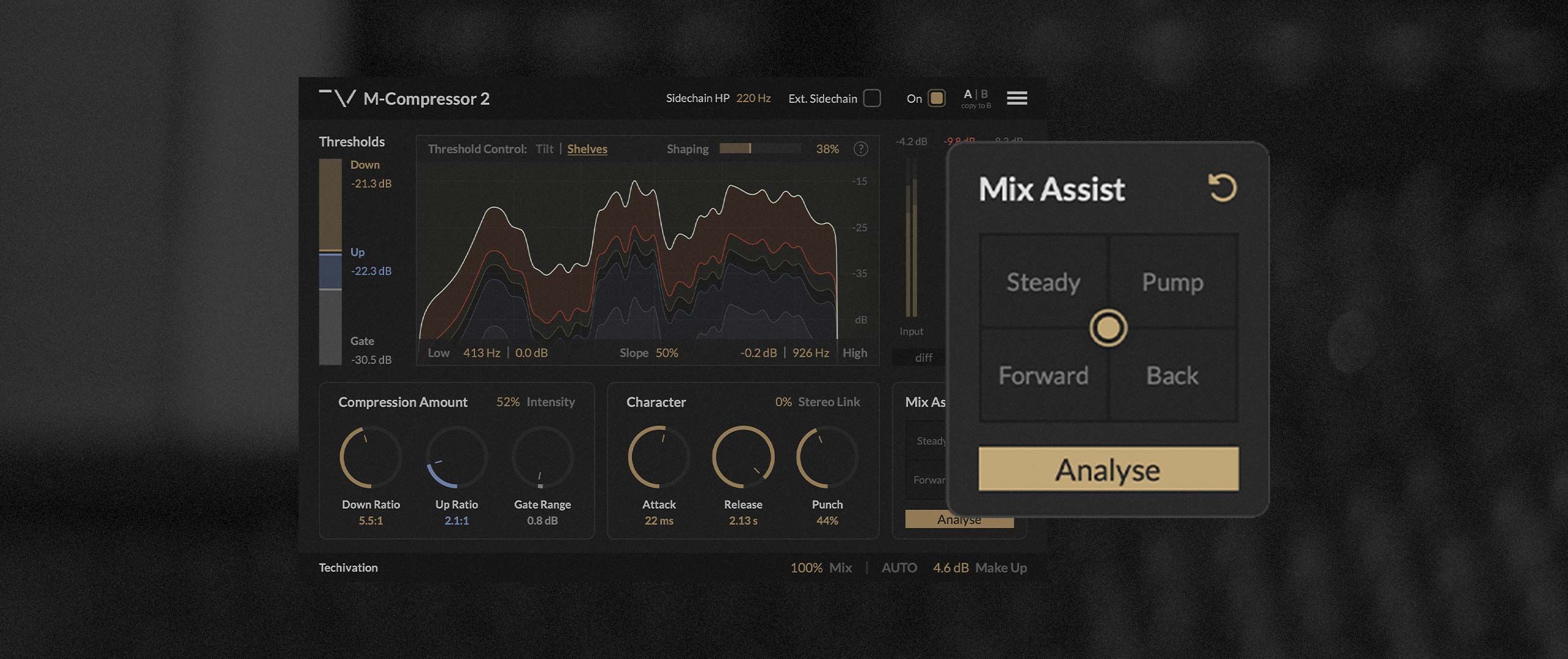
M-Compressor 2 introduces an intent-driven Mix Assistant built around that way of thinking. Instead of treating intelligent processing as a one-click decision, it analyses the incoming audio and creates a set of compression styles tailored to the source.
The analysis considers the sound’s characteristics, level balance and dynamic behaviour before establishing useful parameter ranges. In other words, the same intent isn’t applied with a fixed preset every time. A vocal, drum bus, bass line and full mix shouldn’t all be pushed “Forward” using identical attack times, thresholds or ratios.
Once the analysis is complete, M-Compressor 2 generates 12 styles representing useful compression directions. Four can be loaded into the interface at once, with the joystick allowing seamless movement between them. A slot can be right-clicked and swapped for another style, so the four available directions can be arranged around the needs of the current track.
Move toward one style and the plug-in adjusts its processing to pursue that outcome. Move between two or more styles and their characteristics blend together. The result isn’t limited to a handful of fixed states; the spaces between them become part of the sound design.
What happens when a sound is pushed “Forward”?
Consider the goal of bringing a track forward in the mix. That’s easy to describe, but there’s no single “forward” compressor setting.
Depending on the source, creating that impression might involve controlling peaks, lifting low-level detail, changing the transient shape, increasing density or adjusting the frequency-dependent response. It could require a different balance of attack, release, downward ratio, upward ratio and thresholds.
When the joystick is moved toward the Forward style, M-Compressor 2 coordinates these parameters based on its analysis of the track. It isn’t simply turning up the signal or recalling a generic preset. It sets and moves the relevant controls within ranges established for that particular audio.
This distinction matters. More level can make something louder, but it doesn’t always make it feel closer. Perceived position also comes from transient definition, dynamic contrast, sustain, detail and tonal balance. Sometimes a source comes forward by becoming denser; at other times, preserving its initial impact is the more convincing route.
Intent-driven processing gives the plug-in a destination while still accounting for what it’s processing.
More than downward compression
This workflow becomes especially useful because M-Compressor 2 isn’t controlling just one conventional compressor. Its dynamics section combines three processes.
- Downward compression attenuates signals above the Down threshold, helping to control peaks and reduce excessive dynamic jumps.
- Upward compression boosts information between the Up and Gate thresholds, bringing quieter details forward.
- Gating turns down material below the Gate threshold, preventing upward compression from needlessly raising background noise, room spill or bleed.
Together, these stages provide much finer control over the shape of a performance. A sound can be made more consistent from both directions without automatically pulling unwanted low-level noise into the foreground.
M-Compressor 2 also performs true spectral compression. Rather than dividing the signal into a small number of crossover bands, it can apply different amounts of compression across individual frequencies. The spectral threshold can be shaped directly, while the Shaping control continuously analyses the signal and relaxes muddy build-ups or harsh resonances.
Shelves mode provides detailed control over how strongly low and high frequencies are compressed, using Frequency, Gain and Slope controls. Tilt mode offers a faster way to shift the compression balance across the spectrum in one move. These tonal decisions can form part of the overall intent rather than remaining separate from the dynamics.
The assistant doesn’t lock the engineer out
An intelligent workflow should shorten the path to a result, not hide the work behind a mysterious button. Every change made by M-Compressor 2’s Mix Assistant remains visible in the plug-in parameters.
That makes the assistant useful in two ways. It can provide a fast route toward a desired result, but it can also reveal how that result is being created. Engineers can inspect the settings, fine-tune them and take the processing somewhere more specific.
Manual adjustments are also folded into the styles. If the engineer changes the processing after analysis, joystick movement continues from that edited direction rather than discarding it. The assistant follows the decisions already made and blends toward the selected intentions while respecting those changes.
So the workflow remains interactive: analyse, choose directions, move toward the desired feel, adjust where necessary, then continue blending from there.
Compression starts with a reason
The most useful compression decisions begin before any control is touched. A compressor might be there to restrain peaks, reveal detail, build glue, create depth, reshape transients or turn a polite sound into something gloriously overcommitted.
Once the goal is clear, the technical choices become easier to judge.
M-Compressor 2’s intent-driven workflow is built around that principle. Its intelligent analysis handles the relationship between the source and the many available parameters, while the styles and joystick let engineers work in terms of musical direction.
It doesn’t remove decision making from compression. It moves the decision to where it belongs: what should this sound become?
Share this Article
Featured in this post
![M-EQ Review By Czar [Video]](https://cdn.sanity.io/images/9uzzx98j/production/341fd252af5cfdce3815b27290e6ccf6b1185b98-1280x720.jpg)